
Calling WebService using HttpClient
Sample Project
Executable sample for this article: CloudyWing/HttpClientWebServiceSample.
The sample has been rewritten in .NET 10, which differs from the time this article was written. It retains the core approach of constructing SOAP 1.2 messages with HttpClient and handling complex types with XmlSerializer, but breaks down the single static utility method into components such as a typed client, serialization, envelope, and result parsing. It also uses IHttpClientFactory to manage HttpClient and includes a ready-to-run ASMX service and unit tests. Since there are discrepancies with the early implementation in the text, it is recommended to read both for comparison.
.NET provides comprehensive support for WebServices, and typically, you can complete a call simply by adding a "Web Reference" in Visual Studio. However, due to certain factors—such as the development environment being unable to connect to the WebService—you may be unable to add a reference. In such cases, you might attempt to call the WebService without adding a Web Reference.
A common approach in .NET Framework is to use a combination of WebClient and Reflection to dynamically generate the WebService service code, as shown below:
public class InvokeWebService {
    public object InvokeWebservice(string url, string @namespace, string classname, string methodname, object[] args) {
        try {

            if ((classname == null) || (classname == "")) {
                classname = GetWsClassName(url);
            }
            System.Net.WebClient wc = new System.Net.WebClient();
            System.IO.Stream stream = wc.OpenRead(url + "?WSDL");
            System.Web.Services.Description.ServiceDescription sd = System.Web.Services.Description.ServiceDescription.Read(stream);
            System.Web.Services.Description.ServiceDescriptionImporter sdi = new System.Web.Services.Description.ServiceDescriptionImporter();
            sdi.AddServiceDescription(sd, "", "");
            System.CodeDom.CodeNamespace cn = new System.CodeDom.CodeNamespace(@namespace);
            System.CodeDom.CodeCompileUnit ccu = new System.CodeDom.CodeCompileUnit();
            ccu.Namespaces.Add(cn);
            sdi.Import(cn, ccu);

            Microsoft.CSharp.CSharpCodeProvider csc = new Microsoft.CSharp.CSharpCodeProvider();
            System.CodeDom.Compiler.ICodeCompiler icc = csc.CreateCompiler();
            System.CodeDom.Compiler.CompilerParameters cplist = new System.CodeDom.Compiler.CompilerParameters();
            cplist.GenerateExecutable = false;
            cplist.GenerateInMemory = true;
            cplist.ReferencedAssemblies.Add("System.dll");
            cplist.ReferencedAssemblies.Add("System.XML.dll");
            cplist.ReferencedAssemblies.Add("System.Web.Services.dll");
            cplist.ReferencedAssemblies.Add("System.Data.dll");

            System.CodeDom.Compiler.CompilerResults cr = icc.CompileAssemblyFromDom(cplist, ccu);
            if (true == cr.Errors.HasErrors) {
                System.Text.StringBuilder sb = new StringBuilder();
                foreach (System.CodeDom.Compiler.CompilerError ce in cr.Errors) {
                    sb.Append(ce.ToString());
                    sb.Append(System.Environment.NewLine);
                }
                throw new Exception(sb.ToString());
            }

            System.Reflection.Assembly assembly = cr.CompiledAssembly;
            Type t = assembly.GetType(@namespace + "." + classname, true, true);
            object obj = Activator.CreateInstance(t);
            System.Reflection.MethodInfo mi = t.GetMethod(methodname);
            return mi.Invoke(obj, args);
        } catch (Exception ex) {
            throw new Exception(ex.InnerException.Message, new Exception(ex.InnerException.StackTrace));
        }
    }

    private string GetWsClassName(string wsUrl) {
        string[] parts = wsUrl.Split('/');
        string[] pps = parts[parts.Length - 1].Split('.');

        return pps[0];
    }
}However, since .NET Core does not include the "System.Web.Services" library, I referred to this article ".Net core calling WebService" and used HttpClient to call the WebService using the SOAP message format.
Consider svcutil first
In .NET Core and later, the standard way to call SOAP is to use dotnet-svcutil (or the "WCF Web Service Reference" in Visual Studio) to generate a strongly-typed client from a WSDL. It consumes a local WSDL file, so even if the development environment cannot connect to the service, as long as you can copy a WSDL from elsewhere, you can still generate the client without needing to connect to the endpoint.
Note that the generated client is a snapshot of that specific WSDL; if the WebService interface changes later, you must copy a new WSDL and regenerate it.
The manual SOAP implementation below is intended for situations where you cannot obtain a usable WSDL: the WSDL is lost, the format is so corrupted that svcutil fails to parse it, or you only have a sample SOAP message.
Regarding the content of the WebService SOAP message format, you can find a WebService written in C# and view the Request and Response formats for a specific Method at the URL "{httpUrl}?op={method}". It generally provides "SOAP 1.1", "SOAP 1.2", and "HTTP POST" formats. Below is an example of the "SOAP 1.2" format used in this instance.
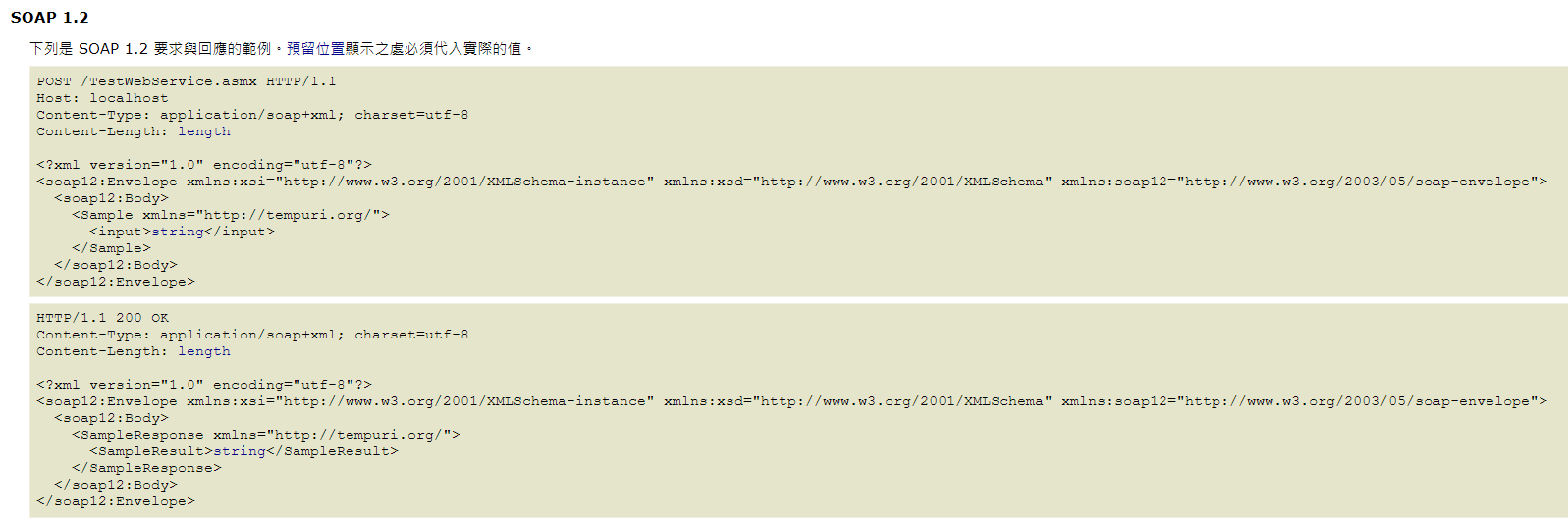
Zoom in to view.
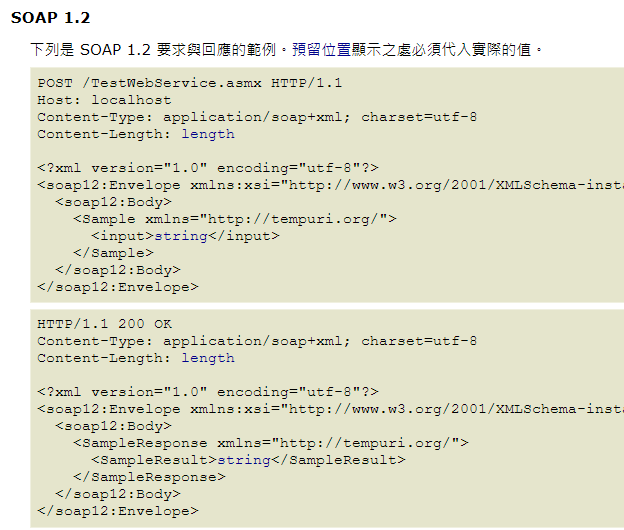
Of course, I was not entirely satisfied with the solution in the article because the actual input and output types are not necessarily simple types. Therefore, I used XmlSerializer to perform conversions between Objects and XML. The final code is as follows:
public static class WebServiceUtils {
    // Sharing a single HttpClient instance is an early official recommendation to avoid socket exhaustion caused by frequent new/Dispose.
    // The side effect is that connections are kept-alive by the connection pool, DNS is not re-resolved, and requests will hit the old address if the backend IP changes;
    // For production projects, it is recommended to use IHttpClientFactory (rotating handlers) or SocketsHttpHandler.PooledConnectionLifetime to resolve this.
    private static readonly HttpClient httpClient = new HttpClient();

    public static async Task<TResponse> ExecuteAsync<TResponse>(string uri, string method, IDictionary<string, object> arguments, string @namespace = "http://tempuri.org/") {
        XmlSerializerNamespaces serializerNamespaces = new XmlSerializerNamespaces(new[] { XmlQualifiedName.Empty });
        XmlWriterSettings settings = new XmlWriterSettings {
            Indent = true,
            OmitXmlDeclaration = true
        };

        string argsXml = string.Join("", arguments.Select(x => {
            Type type = x.Value.GetType();
            XmlSerializer _serializer = new XmlSerializer(type);
            StringBuilder sb = new StringBuilder();
            using (XmlWriter writer = XmlWriter.Create(sb, settings)) {
                _serializer.Serialize(writer, x.Value, serializerNamespaces);
                // After the original Serializer, the Root will be the Type Name, so it must be replaced with the Dictionary Key.
                // The reason for not using Regex to replace the Type Name for more precise replacement is that it causes issues with aliases.
                // For example: Int32 would become <int></int> instead of <Int32></Int32>
                return Regex.Replace(sb.ToString(), $@"((?<=^<)(\w*)(?=>))|(?<=</)\w*(?=>$)", x.Key);
            }
        }));

        string soapXml = $@"
            <soap12:Envelope xmlns:xsi=""http://www.w3.org/2001/XMLSchema-instance"" xmlns:xsd=""http://www.w3.org/2001/XMLSchema"" xmlns:soap12=""http://www.w3.org/2003/05/soap-envelope"">
              <soap12:Body>
                <{method} xmlns=""{@namespace}"">
                    {argsXml}
                </{method}>
              </soap12:Body>
            </soap12:Envelope>
        ";

        // The media type for the SOAP 1.2 specification is application/soap+xml (text/xml is the type for SOAP 1.1);
        // Using text/xml here still works for this ASMX, but for strict compliance, it should be changed to application/soap+xml.
        StringContent content = new StringContent(soapXml, Encoding.UTF8, "text/xml");
        using (HttpResponseMessage message = await httpClient.PostAsync(uri, content).ConfigureAwait(false)) {
            if (!message.IsSuccessStatusCode) {
                throw new HttpRequestException($"HTTP request failed with status code {message.StatusCode}: {message.ReasonPhrase}");
            }

            string result = await message.Content.ReadAsStringAsync().ConfigureAwait(false);

            XDocument xdoc = XDocument.Parse(result);
            XNamespace ns = @namespace;
            string resultTag = method + "Result";

            XElement xelement = xdoc.Descendants(ns + resultTag).Single();

            XmlSerializer serializer = new XmlSerializer(typeof(TResponse), new XmlRootAttribute(resultTag) { Namespace = @namespace });

            using (XmlReader reader = xelement.CreateReader()) {

                return (TResponse)serializer.Deserialize(reader);
            }
        }
    }
}Actual Test
Here, we first define nested Request and Response classes to serve as the WebService parameters and return values, testing whether more complex types can be supported.
public class Request {
    public int Id { get; set; }

    public string Name { get; set; }

    public List<string> Strings { get; set; }

    public List<InnerRequest> InnerRequests { get; set; }
}

public class InnerRequest {
    public int Id { get; set; }

    public string Name { get; set; }
}

public class Response {
    public int Id { get; set; }

    public string Name { get; set; }

    public List<string> Strings { get; set; }

    public List<InnerResponse> InnerResponse { get; set; }
}

public class InnerResponse {
    public int Id { get; set; }

    public string Name { get; set; }
}The WebService is intentionally designed to use multiple parameters.
[WebService(Namespace = "http://tempuri.org/")]
[WebServiceBinding(ConformsTo = WsiProfiles.BasicProfile1_1)]
[System.ComponentModel.ToolboxItem(false)]
// Uncomment the following line if you want to allow calling this Web Service from script using ASP.NET AJAX.
// [System.Web.Script.Services.ScriptService]
public class TestWebService : System.Web.Services.WebService {

    [WebMethod]
    public Response HelloWorld(Request request1, Request request2) {
        return new Response {
            Id = 31,
            Name = "32",
            Strings = new List<string> {
                "331",
                "332"
            },
            InnerResponse = new List<InnerResponse> {
                new InnerResponse { Id = 3411, Name = "3412" },
                new InnerResponse { Id = 3421, Name = "3422" }
            }
        };
    }
}string uri = "https://localhost:44399/TestWebService.asmx";
string method = "HelloWorld";
IDictionary<string, object> arguments = new Dictionary<string, object>();
Request request1 = new Request {
Id = 11,
Name = "12",
Strings = new List<string> {
"131",
"132"
},
InnerRequests = new List<InnerRequest> {
new InnerRequest { Id = 1411, Name = "1412" },
new InnerRequest { Id = 1421, Name = "1422" }
}
};
Request request2 = new Request {
Id = 21,
Name = "22",
Strings = new List<string> {
"231",
"232"
},
InnerRequests = new List<InnerRequest> {
new InnerRequest { Id = 2411, Name = "2412" },
new InnerRequest { Id = 2421, Name = "2422" }
}
};
arguments.Add("request1", request1);
arguments.Add("request2", request2);
Response response = await WebServiceUtils.ExecuteAsync<Response>(uri, method, arguments);Checking the Watch window confirms that the WebService received the parameters correctly.
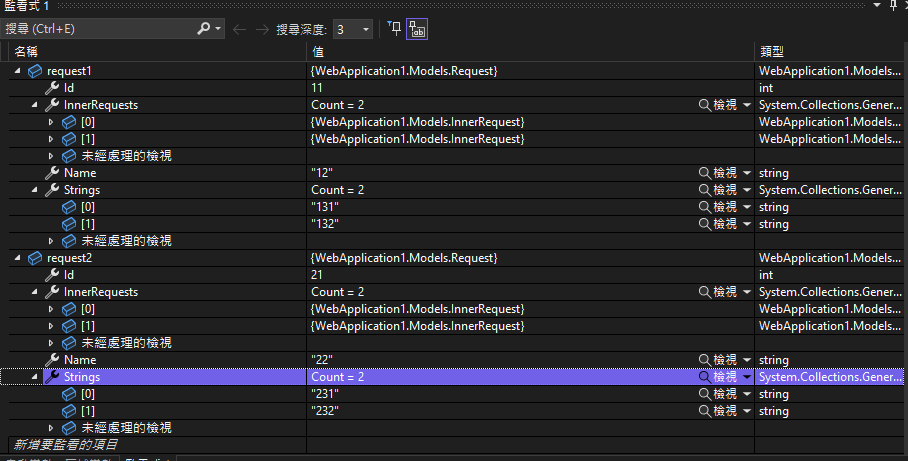
Checking the Watch window confirms that the execution result matches what the WebService returned.
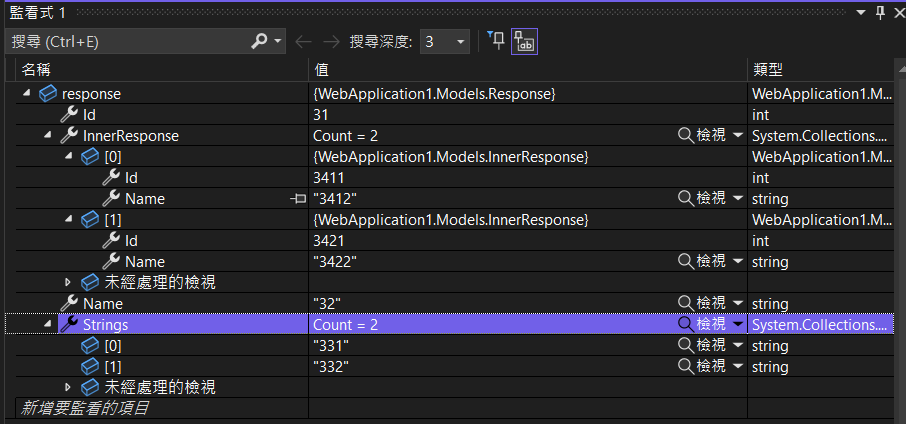
Change Log
- 2023-02-13 Initial document created.
- 2026-05-31
- Fixed a typo in the
ExecuteAsyncparameter type (IDictionary<string, string>should beIDictionary<string, object>). - Rewrote the description to reflect the actual HttpClient + SOAP approach.
- Added a link to the corresponding executable sample.
- Added code comments regarding HttpClient lifecycle and SOAP 1.2 media type.
- Added a tip on using
svcutilto generate a client from WSDL and specified the scenarios where the manual approach is applicable.
- Fixed a typo in the